Working with Data blocks and Actors
Scenarios do more than run commands in order: blocks can also pass values to each other. A condition reads a variable, "Move an Actor" receives the Actor it should move, and a line of dialogue prints a number. Whimtale calls these values data, and the handles they travel through are data handles.
Data allows making complex gameplay behaviors that respond to what a Hero did — not just through dialogue choices and stored variables, but also depending on what Hero (or other Actors) had done in the game world, on Stages. They can also be used to make puzzles, or making mechanics seen in games in general!
This page explains how data handles work, and then focuses on the value that can cause the most confusion: an Actor reference — a value that points at one particular Actor in the game world, rather than at an Actor type.
Data handles and execution handles
There are two kinds of links between blocks:
- Execution links (white arrows) decide what runs next. A command can only continue to one block.
- Data links (colored handles) carry values. A data output can feed several inputs at once, while every data input accepts a single link — connecting a second one replaces the first.
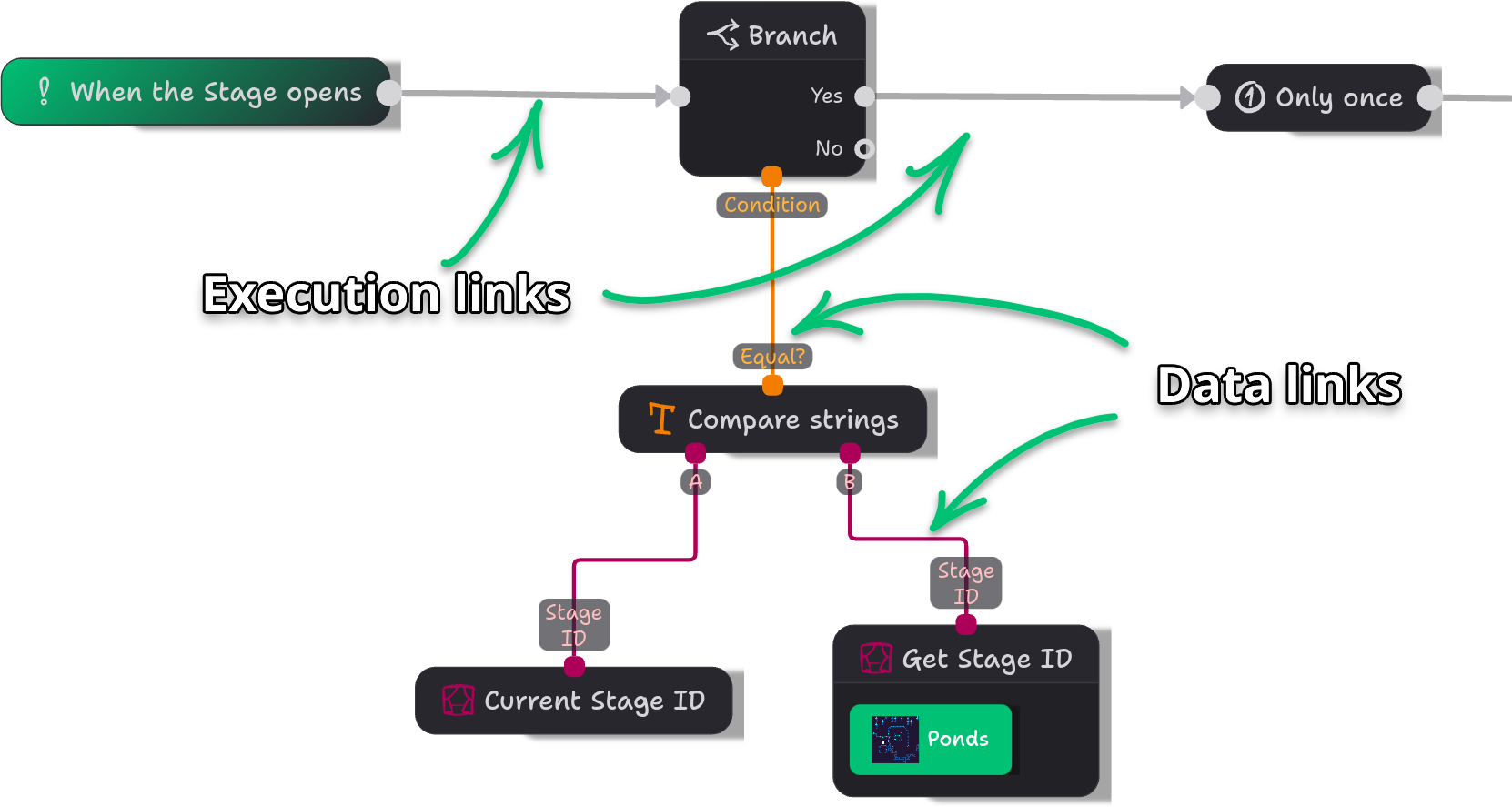
Every data handle has a type: Number, Text, Yes/No, or Actor. Handles are colored by their type, and only handles of the same type can be connected. This is what stops you from, say, feeding a line of dialogue into a coordinate.
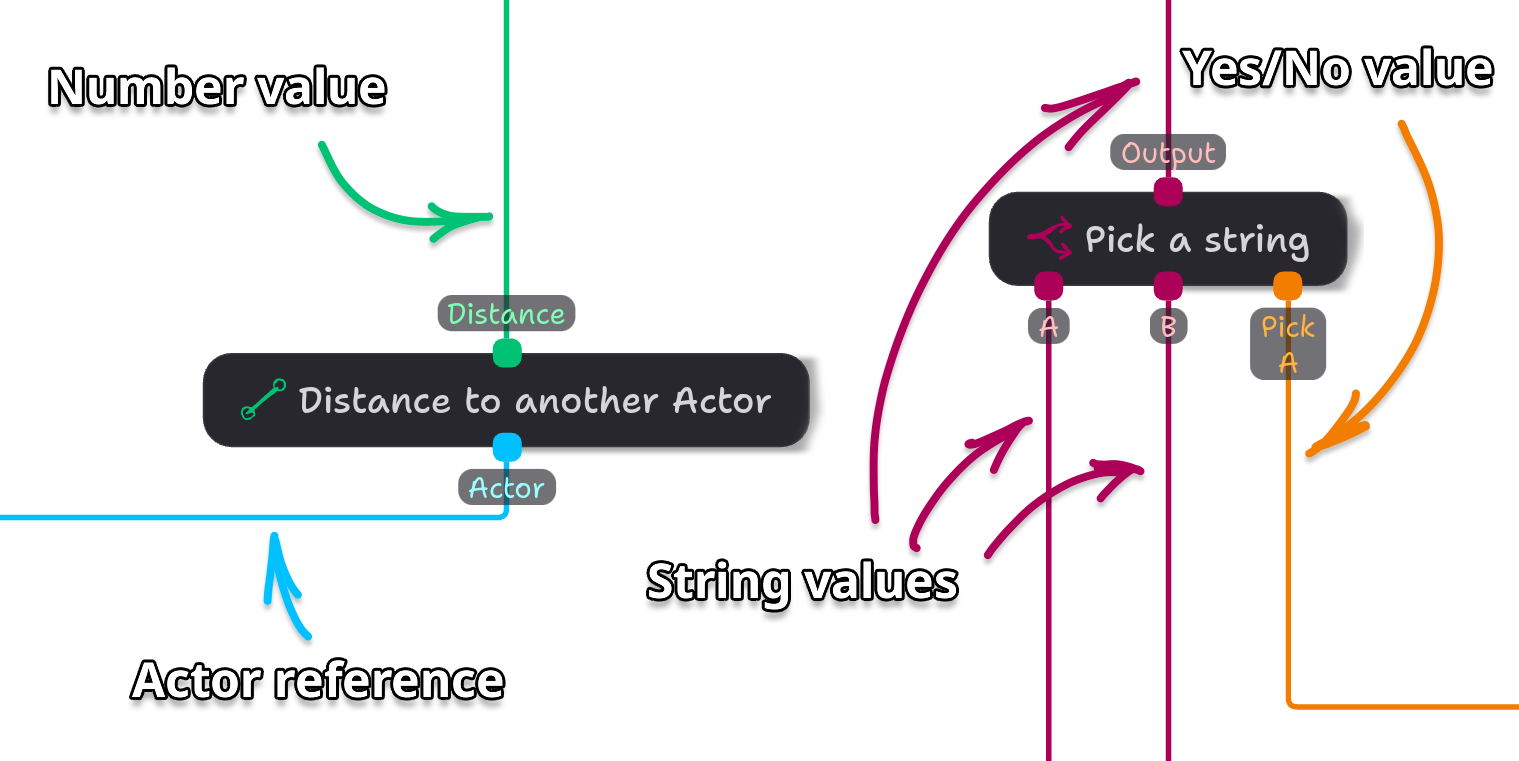
Most data inputs also have a small field where you can type a value directly. That is handy for constants like a coordinate or a message, and a link connected to the input takes the place of the typed value. Actor inputs have no such field: they only accept a link, because there is nothing sensible to type there.
When do data blocks run?
Data blocks such as "Read variable" or "Random number" have no execution handles, and that means nothing "executes" them on their own. They are evaluated when a block that needs them runs.
This has a consequence that can be non-intuitive at first: a data block that feeds two inputs is evaluated twice, once per link. If you feed a "Random number" into two blocks, they will have two different values. (Unless you're lucky, hehe!)
If a value must stay the same for several blocks, store it once into a variable with "Write variable", then read that variable everywhere else.
For most blocks this is exactly what you want: "Hero's location" read in two different places gives the location at each moment, because you don't want to have old coordinates.
But some blocks don't rerun.
Blocks that remember their values
Some blocks return several values at once that make sense only when used together. Other blocks affect the Scene (e.g. move Actors) and tell whether they were successful — this data can be handy but not always needed, and, more importantly, such data makes sense only for block's particular attempt to run. Such blocks are executed, and their values are preserved (cached) until you re-run the block. Here are some of such blocks:
- "Get an Actor on the Scene", "Find an Actor around the Hero", and "Find an Actor around me" output whether something was found, and which Actor it was.
- Movement blocks such as "Step in direction" or "Push an Actor" output whether the movement indeed happened.
- All "Create Actor" variants output the Actor they created.
Their outputs are cached: Whimtale saves the result when the block runs, so reading it later does not repeat the search, the creation, or the movement. In the editor, such outputs are drawn as labeled rows inside the block instead of handles floating around it.
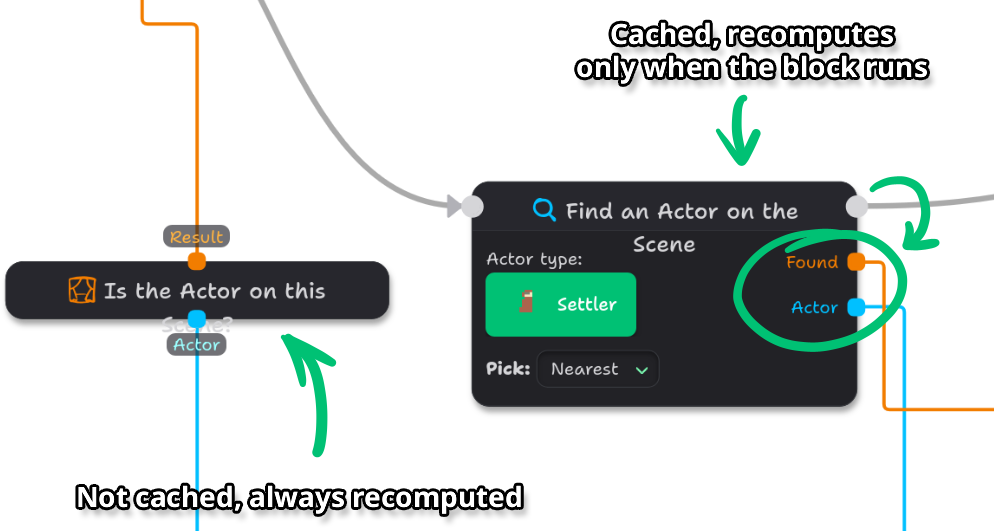
A few rules follow from that:
- Reading one of them before the block ever ran usually gives "no Actor" or "No".
- Reading one later gives the last result, even if that Actor has walked away or was destroyed in the meantime.
- Each Actor keeps its own copy per block, so two Actors running the same block never share a result. The values are also saved and loaded from savegames or autosaves.
Be careful when using results of one event's execution results in another event: while the latest value can be carefully used (e.g. "I only need to know the latest created Actor"), it is usually easier to store the execution result in a variable to have more control, and also to not make the Scenario look like a tangled spaghetti pile.
Actor references
A tiny bit of terminology:
Actors in Whimtale can repeat, even in one Stage. When we mean an Actor as a template with its own Scenario and visuals, that then gets repeated across Stages, we can refer to them as Actor types. When we're talking about one specific Actor that is physically placed on a Stage, we can call it an Actor instance.
An Actor reference points at one particular Actor instance that exists in the game right now. It does not refer to an Actor type, nor it is the the asset ID — an Actor type says "what this is", a reference says "which one this is".
You mainly get references from these blocks:
- This Actor — returns the Actor reference to an instance whose scenario is running.
- When touching another Actor — the Actor that was touched.
- Create Actor, Create Actor (Programmatic), Create Actor (Advanced) — the Actor that was just created.
- Get an Actor on the Scene — an Actor of a chosen type that is currently on the Stage being played.
- Find an Actor around the Hero, Find an Actor around me — an Actor in one of the neighboring cells.
And you use them in blocks that act on a given Actor:
- Destroy an Actor, Push an Actor, Play Animation
- Step towards an Actor, Step away from an Actor
- Move an Actor in direction, Move an Actor to a location, and their Programmatic variants
- Actor's location, Distance to another Actor
- Is it this Actor?, Is the Actor valid?, Is the Actor on this Scene?
Blocks that need an Actor can do nothing when they don't get a valid reference, or instead apply their effects on the current Actor. You can hover the blocks in the Scenario editor to read more detailed documentation on how they behave under different data inputs.
The Hero has no Actor reference. This is why many commands have sister blocks in the Hero category. For example, to get where the Hero is, use "Hero's location" instead.
Remembering an Actor between events
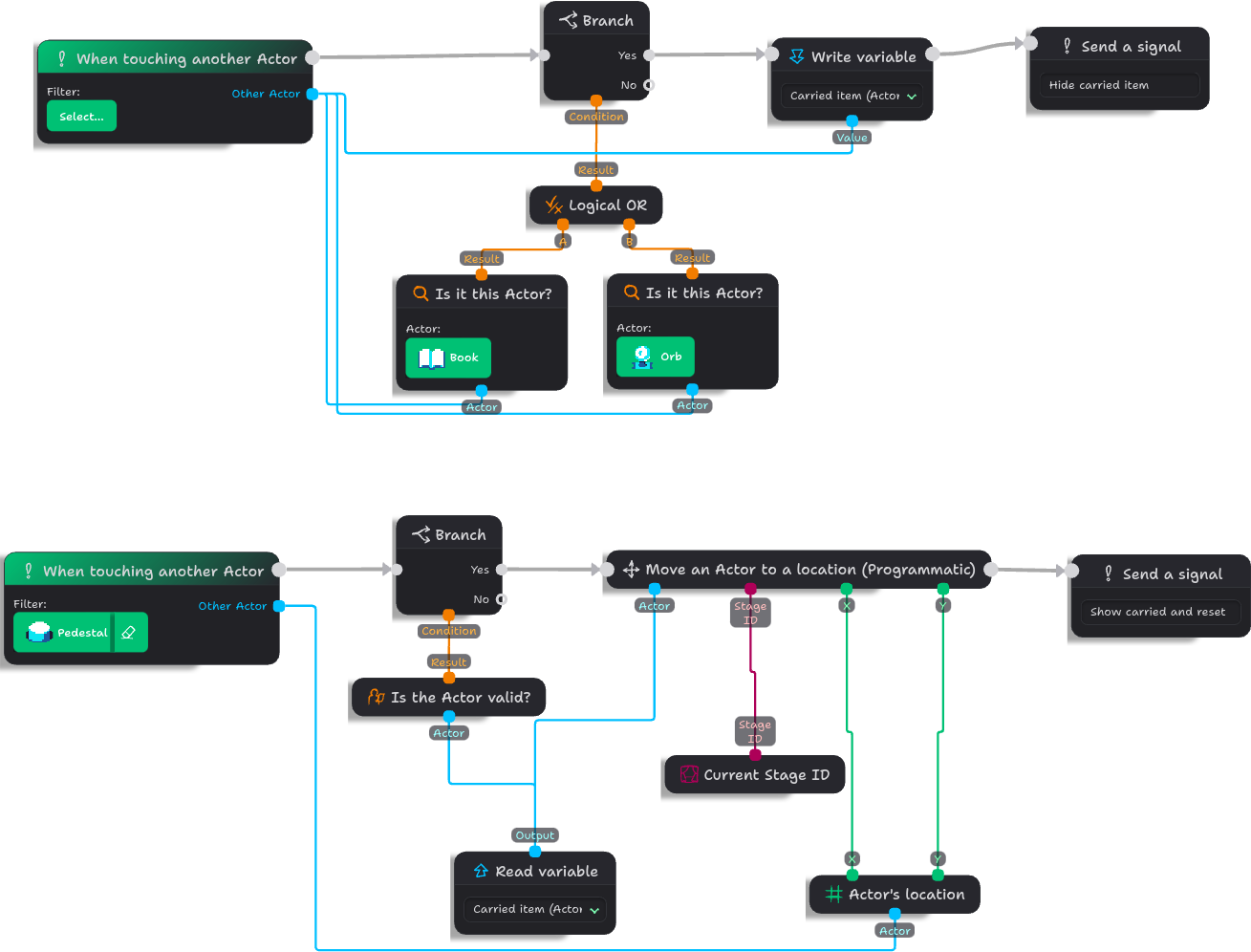
Actor references can live in variables — just like numbers and text. You can create a variable of type Actor in the same "Manage Variables" window of the Data category, with the only difference that Actor variables cannot have a starting value.
A small example: we can create a Scenario that "picks up" (hides) an Actor, and then place them at specific platforms.
Important gotchas with Actor references
Actors are dynamic in nature, and this sometimes can lead to unwanted surprises:
Broken references
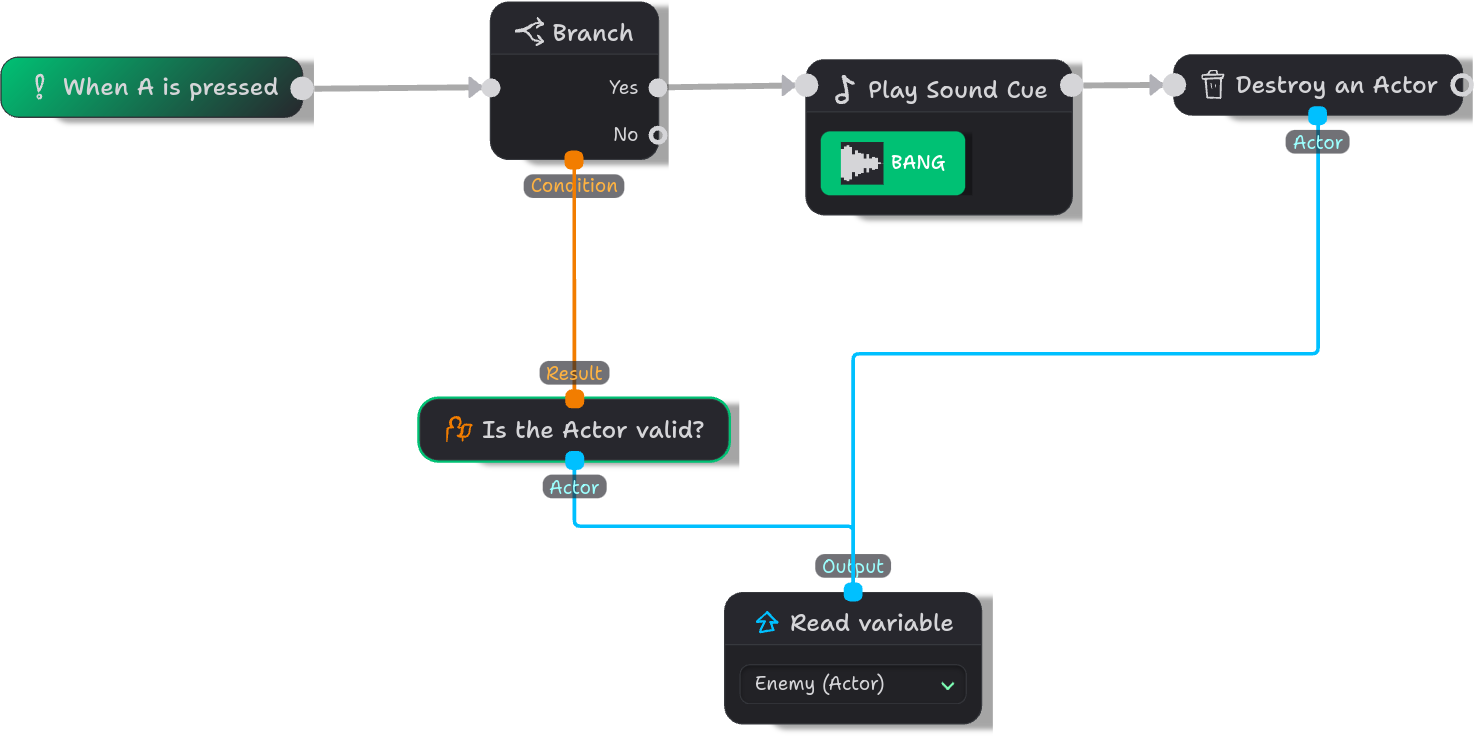
What happens when an Actor that is referenced elsewhere gets destroyed? Then its reference becomes invalid. To catch that, you can add a Branch block with an "Is the Actor valid?" data block tied to it to avoid working with broken references, and even to fetch a new one when needed.
Actors not on the current Scene
Say you create a mechanic where a Hero shoots enemies with their blaster. The player can switch targets with A and B buttons, thus one of the Actors is stored in a variable. But what happens when they leave the dangerous Stage and move to one with no enemies? The reference is then still valid, but we can't shoot across Stages!
"Is the Actor on this Scene?" returns No for Actors that are still alive but stand on another Stage.
Coordinates are not tied to a Stage.
An Actor on another Stage still reports its own coordinates there, and comparing them with something on the current Stage is probably meaningless. As with the previous example, an "Is the Actor on this Scene?" will help with such cases.
Where to go next
- Using Asset IDs — for Actor types and Stages rather than individual Actors.
- Variables and conditionals — for storing values and branching on them.
- Writing scenarios — for the basics of connecting blocks.
- Global (Hero) Scenarios — for logic that runs outside any Actor.